
Mastering IBM DB2 Date Functions

You will love this blog because date functions and formatting differ dramatically between databases, but I have covered that with brilliant examples and clear and concise explanations below.
All of these examples have come from my books and training classes. Please do me a favor and tell your training coordinator that you know the best technical trainer in the world. Ask them to hire me to train at your company, either on-site or with a virtual class. They can see our classes, outlines, and a sample of my teaching at this link on our website.
https://coffingdw.com/education/
If you are looking for a better way to access and develop data on DB2, Netezza, or any system, I hope you will download my Nexus Query Chameleon software, which works on all systems and is the best integration and query federation tool ever built. It has taken 19 years to join 20 tables spanning 20 different systems in a single query, but nobody else is even close to that capability. You can now use Nexus to join tables and views from DB2 and Netezza with Excel worksheets and Microsoft Access, and any combination of cloud and on-premises databases in a single query. Check out the video below and see Nexus in action.
The first query in the example below retrieves the current system date and time. The second query retrieves various components of the current system date and time. It fetches today’s date, the day, month, and year components separately and presents the date and time in a specific format (‘DD-MON-YYYY HH:MI:SS’) as a timestamp.
Oracle and DB2 insists all queries have a FROM clause. Oracle has a table called DUAL and IBM has one called SYSIBM.SYSDUMMY1. The SYSDUMMY1 table is a convenient tool used when a user wants to retrieve system information, such as a date, time, or timestamp without querying a table in the database. It’s important to note that SYSDUMMY1 doesn’t store any actual data. It is a lightweight dummy table that exists solely for the execution of SQL expressions and functions.

The first query in the example below retrieves the current date using the ANSI SQL standard function CURRENT_DATE and aliases it as ANSI_DATE. The second query performs several operations on the current date. It retrieves the current date, calculates tomorrow’s date by adding one day to the current date (CURRENT_DATE + 1), calculates yesterday’s date by subtracting one day from the current date (CURRENT_DATE – 1), and computes the difference in days between yesterday and today by subtracting yesterday’s date from today’s date. These operations are executed within the context of the SYSIBM.SYSDUMMY1 table, a special table in DB2 used for performing calculations without referencing any actual table data.

This query example below calculates and presents various temporal intervals relative to the current date. It includes yesterday’s date, the date 60 days in the future, the date 60 months (5 years) in the future, and the date 60 years in the future. These intervals provide a range of temporal perspectives for analysis or planning purposes. The query doesn’t require a real table reference and uses the special dummy table sysibm.sysdummy1 for executing SQL statements.

The example below is the fundamental way in which most databases retrieve the current date and current timestamp, which are keywords using the ANSI standard. For clarity, it assigns aliases ANSI_DATE and ANSI_TIMESTAMP to these values.

The example below shows a different spelling to get the current_date, current_time, and current_timestamp. Notice there is no underscore in the key words current date, current time, and current timestamp, which is unique to DB2.

In the example below, notice the CURRENT_TIMESTAMP and the SYSDATE have the same date and time, but the SYSDATE does not include the microseconds. Also notice the DATE and SYSDATE differ because the DATE does not include the time.

In our example below, In IBM DB2, CURRENT_DATE and SYSDATE serve similar purposes but have differences in their behavior: CURRENT_DATE: This function returns the current date according to the system clock of the database server. It does not include the time component. When you use CURRENT_DATE, you get the date portion only, without any time information. SYSDATE: This function also returns the current date according to the system clock of the database server, but it includes the time component. When you use SYSDATE, you get both the date and the time at the moment when the function is executed. You would expect to see the current date in the DATE column with no time information, and the current date and time in the SYS_DATE column.

The difference between CURRENT_TIMESTAMP and LOCAL_TIMESTAMP lies in how they handle time zones. CURRENT_TIMESTAMP always returns the timestamp in UTC, while LOCAL_TIMESTAMP returns the timestamp adjusted to the time zone of the database server. In our examples above the database server time zone is UTC, so the timestamps are equivalent.

If you add or subtract a number from a date, it adds or subtracts several days from the date. And yes, DB2 knows the calendar and the saying, “30 days hath September, April, June, and November. All the rest have 31 except February alone, to which we 28 assign, but leap year makes it 29.”

In the DB2 SQL query below, the ADD_MONTHS function calculates a new date by adding a specified number of months to the given date. Notice that we are adding two months to the ORDER_DATE. The result of this operation is aliased as “Due Date2”. The ADD_MONTHS function allows for easy manipulation of dates by adding or subtracting months, which can be useful for tasks like forecasting due dates or scheduling activities based on the order date.

The example below uses the Add_Months Command. What you can do with it is add a month or many months to your date columns. Unfortunately, there is no ADD_YEAR command, but 12 months makes one year!

The example below uses the Add_Months command to show how to add five years by using math easily. Sixty months works fine, but it is better to let the system do the math.

The TO_DATE function is used to convert a character string representing a date into an actual DATE data type. It is particularly useful when you need to convert a string in a specific format into a date value that can be used in calculations or comparisons within the database.

In DB2, the EXTRACT command extracts a specific component (such as year, month, day, hour, minute, etc.) from a date or timestamp value. It allows users to retrieve and work with individual parts of a date or timestamp data. The query below retrieves orders from the ORDER_TABLE where the month of the order date is September. It utilizes the EXTRACT command to extract the month from the ORDER_DATE column and then filters the results based on that extracted month value.

The example below uses the EXTRACT command to extract a specific component (such as year, month, day, hour, minute, second.) from a date or timestamp value. It allows users to retrieve and work with individual parts of a date or timestamp data.

The query below uses an implied extract to extract from the current timestamp.

Below are ways to extract a date or time from a timestamp.

The example below provides a breakdown of the current timestamp into its various components, such as day of the week, month, quarter, and week of the year, which can be useful for various reporting and analysis purposes.
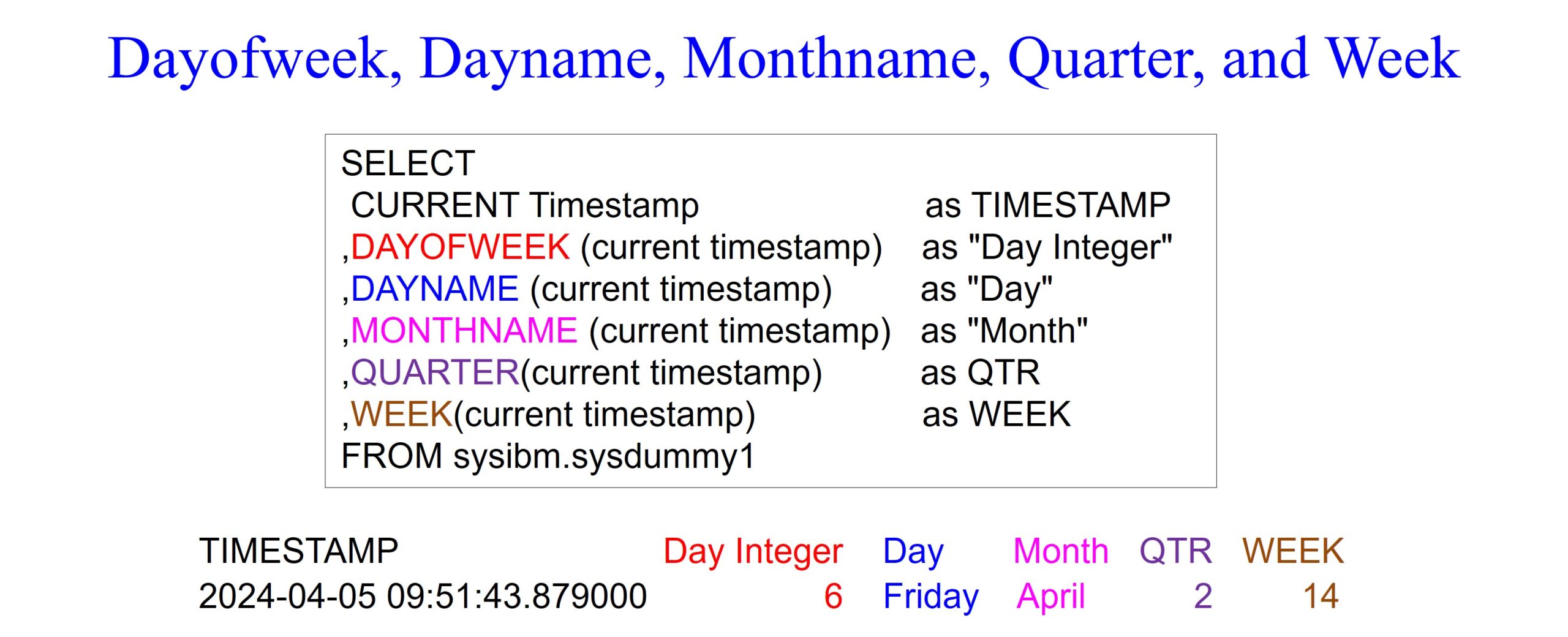
The query below retrieves data from the ORDER_TABLE, extracting and formatting the day, month, and year components from the ORDER_DATE. It also filters the results to include only orders from the year 2022. The TO_CHAR function is used as an implicit extraction tool to format the date components as required for display and filtering.

The LAST_DAY function is used to find the last day of the month for a given date. The first query below compares the results of LAST_DAY using CURRENT_DATE and CURRENT_TIMESTAMP. The second query calculates the difference in seconds between the last day of the month and the current date (SYSDATE).

The NEXT_DAY function is used to find the date of the next occurrence of a specified day of the week after a given date. The NEXT_DAY function takes two parameters: a date value and a day name. It returns the date of the next occurrence of the specified day name after the given date. The day name parameter is case-insensitive and can be provided in full or abbreviated form (e.g., ‘Monday’ or ‘Mon’).

The query below retrieves the last day of the month of the previous month for different dates. It achieves this by first converting the current date or specified dates into character strings (CHAR) and then extracting the year and month parts (SUBSTR). Next, it appends ’01’ to the year and month, effectively representing the first day of the month. Finally, it subtracts 1 day from this first day of the month to obtain the last day of the previous month. The results demonstrate the last day of the month for the current date, for January in the year 2024, and for a date in a leap year (March 3, 2024).

The example below retrieves the first day of the month for different dates. It accomplishes this by first converting the current date or specified dates into character strings (CHAR) and then extracting the year and month parts (SUBSTR). Next, it appends ’01’ to the year and month, effectively representing the first day of the month. The results demonstrate the first day of the month for the current date, for February 2024, and for March 2024.

The MONTHS_BETWEEN function in DB2 calculates the number of months between two dates or timestamps. It takes two date or timestamp expressions as arguments and returns the difference in months between them. If the second date is later than the first date, the result is positive; if the second date is earlier, the result is negative. Notice the plus and minus dates in our query examples below.

The example below calculates the number of days between the current date and June 2, 1864, and labels it as “Days_Since_1864_06_02”. It then utilizes a CASE statement to determine the status of this calculation, categorizing it as “Past” if the result is positive, “Today” if it’s zero, and “Future” otherwise. Finally, it presents the current date alongside the calculated number of days and its corresponding status.

The TRUNC function in DB2 is used to truncate a date or timestamp to a specified level of precision. It returns the date or timestamp with the time portion truncated to the nearest specified unit (year, month, day, etc.). Both queries below utilize the TRUNC function to truncate the system date to different levels of precision (year, month, and day). The first query truncates it to the beginning of the year, month, and day while the second query truncates to the hour, minute and second.

The example below retrieves the current timestamp and labels it as “Now”. It then uses the TRUNC function to truncate the current timestamp to the nearest second precision, labeled as “Using_Trunc”. Additionally, it subtracts the microseconds part of the current timestamp to reset it to the start of the current second, labeled as “Reset Microseconds”.

The example below demonstrates the creation of various temporal data types and manipulation of timestamps. It creates two dates, “Date 1” and “Date 2”, two times, “Time 1” and “Time 2”, and a timestamp labeled as “Timestamp”.

DB2 allows you to find the difference between two timestamps using the intervals of fraction of a second, seconds, minutes, hours, days, weeks, months, quarters and years. However, it does not account for leap year, and it always assumes 30 days for each month. The function is called TIMESTAMPDIFF(). This does not have perfect accuracy.

The example below showcases different date intervals starting from the date ‘2024-04-06’. It adds 1 day to the initial date, displaying “Date + 1 Day”, then 1 month, resulting in “Date + 1 Month”, and finally, 1 year, shown as “Date + 1 Year”.

The example below illustrates different time intervals starting from the timestamp ‘2024-04-06 10:00:00’. It adds 1 hour to the initial timestamp, displayed as “Timestamp + Hour”, then 1 minute, resulting in “Timestamp + Minute”, and finally, 1 second, shown as “Timestamp + Second”.

Intervals represent durations or periods of time that can be added to or subtracted from date or timestamp values. The example below showcases the addition of intervals to the current date and time, including one year, three years and two months, and five days, as well as five hours, three minutes, and five seconds, respectively.
